Keyword Matching - Complete Guide
This guide explains exactly how keyword matching works in Reddit Mentions, so you know what to expect when setting up your keywords.
Written By Kurt
Last updated Over 1 year ago
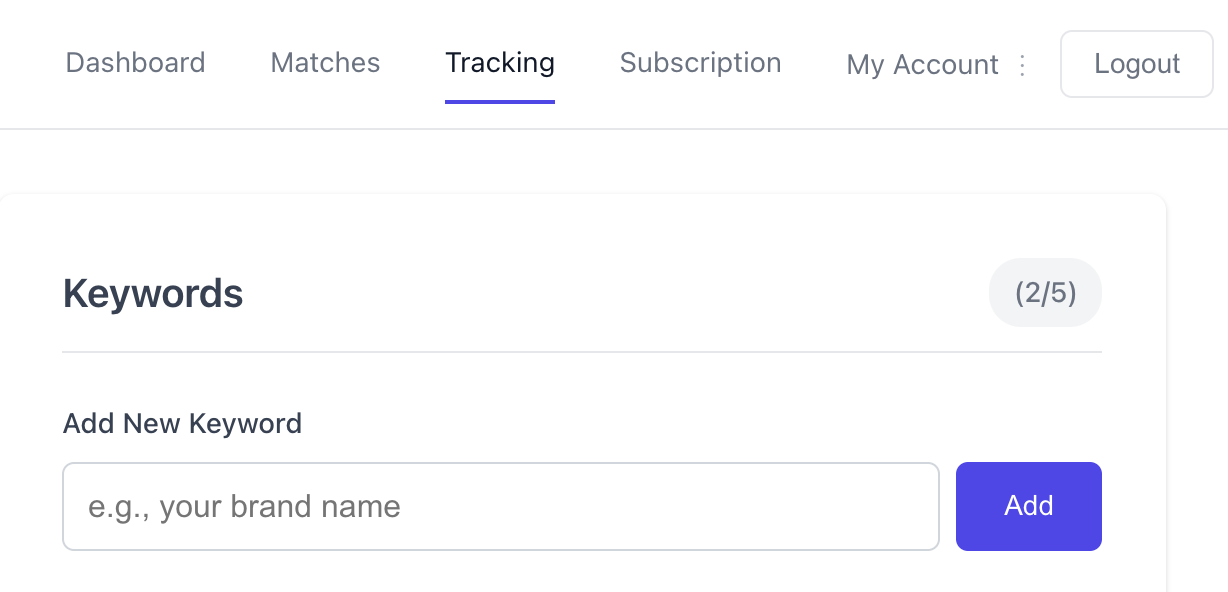
Keywords can be added in the Tracking section of RedditMentions, as seen below
RedditMentions uses exact phrase matching with word boundaries.
✅ It WILL match when your keyword appears as a complete word or phrase
❌ It will NOT match when your keyword appears as part of another word
Expand to see the technical details 🤓
Expand to see the technical details 🤓
RedditMentions uses advanced regex patterns with word boundaries to prevent false positives while maintaining accuracy:
Word Boundary Matching: Uses
\bregex boundaries for standard keywordsSmart Punctuation Handling: Handles common possessives, punctuation, and special characters
Case Insensitive: "CEO" matches "ceo", "Ceo", etc.
No Substring Matching: Prevents false positives like "CEO" matching "faceoff"
Best Practices For Setting Up Keywords
1. Use Specific Phrases
Instead of: AI
Use: artificial intelligence, machine learning, ChatGPT
Why: Specific phrases reduce noise and give you more relevant matches.
2. Add Common Variations
For a brand like "McDonald's", consider adding:
McDonald'sMcDonaldsMaccas(slang variations)
3. Include Possessive Forms
Don't worry about possessives - they're automatically handled:
Keyword:
AppleMatches: "Apple", "Apple's", "Apple."
4. Consider Punctuation Variations
For compound terms, you might want both:
real-timereal time
Common Questions With Examples
Are keywords case sensitive?
Are keywords case sensitive?
NO - All matching is case insensitive.
The keyword Liverpool will match:
✅ "liverpool"
✅ "LIVERPOOL"
✅ "Liverpool"
✅ "LiVeRpOoL"
Will keywords match possessives and punctuation?
Will keywords match possessives and punctuation?
YES - We handle common punctuation.
The keyword Liverpool will match:
✅ "Liverpool's victory"
✅ "Liverpool!"
✅ "Liverpool."
✅ "Liverpool?"
✅ "(Liverpool wins)"
Can I use special characters in keywords?
Can I use special characters in keywords?
YES - We support programming languages and technical terms.
These keywords work perfectly:
✅
C++matches "C++ programming"✅
C#matches "C# development"✅
.NETmatches ".NET framework"✅
real-timematches "real-time system"
Does the app look for 'haiku, the robot' and 'haiku the robot' with 1 keyword?
Does the app look for 'haiku, the robot' and 'haiku the robot' with 1 keyword?
NO - You need separate keywords for different variations.
If you set up the keyword haiku, the robot (with comma), it will ONLY match:
✅ "I love haiku, the robot"
✅ "Haiku, the robot is amazing"
❌ "I love haiku the robot" (missing comma)
If you set up the keyword haiku the robot (without comma), it will ONLY match:
✅ "I love haiku the robot"
✅ "Haiku the robot is amazing"
❌ "I love haiku, the robot" (has comma)
Recommendation: Add both variations as separate keywords if you want to catch both.
What Content Gets Checked?
What Content Gets Checked?
When monitoring a subreddit, we check:
Post Title: The main headline
Post Content: The body text (for text posts)
Comment Text: The full comment body
Example
For this Reddit post:
Title: "Liverpool's victory was incredible!" Content: "The team played amazing football tonight. Arne Slot must be thrilled." Keyword
Liverpool✅ matches (in title)Keyword
Slot✅ matches (in content)Keyword
football✅ matches (in content)Keyword
soccer❌ doesn't match (not present)
Will CEO match words like 'faceoff'?
Will CEO match words like 'faceoff'?
NO
Our word boundary matching prevents false positives:
✅ "The CEO announced..."
✅ "CEO's decision..."
✅ "Meet the CEO."
❌ "faceoff" (CEO is buried inside)
❌ "archaeological" (CEO is buried inside)
Troubleshooting Common Issues
I'm not getting matches I expect
I'm not getting matches I expect
Check for exact spelling:
colourvscolorCheck for punctuation:
real-timevsreal timeAdd variations: Include common misspellings or alternate forms
I'm getting too many irrelevant matches
I'm getting too many irrelevant matches
Be more specific: Instead of
apple, useApple IncoriPhoneAdd context: Instead of
bank, useinvestment bankorWorld BankReview your keyword list: Remove overly broad terms
My brand name isn't being caught
My brand name isn't being caught
Check for variations:
McDonald'svsMcDonaldsInclude common nicknames:
Maccasfor McDonald'sAdd possessive forms: Usually handled automatically, but if you have spare keywords in your plan test out using them
Was this article helpful? Confusing? Missing something?
I’m always happy to hear from you and would love to improve RedditMentions for the better.
Reach each out to me at hello@redditmentions.com any time.
Was this helpful?
Still need help? Ask the team