Sharing Access to your RedditMentions Account
The Account Access Management feature lets you share your RedditMentions account with other people, like team members or agencies. When you grant someone access, they can log in with their own email address and help manage your account. They can view your matches, and adjust your tracking settings.
Written By Kurt
Last updated 9 months ago
How to Grant Access to Someone
Log in to your RedditMentions account
Go to the Tracking page (click "Tracking" in the top menu)
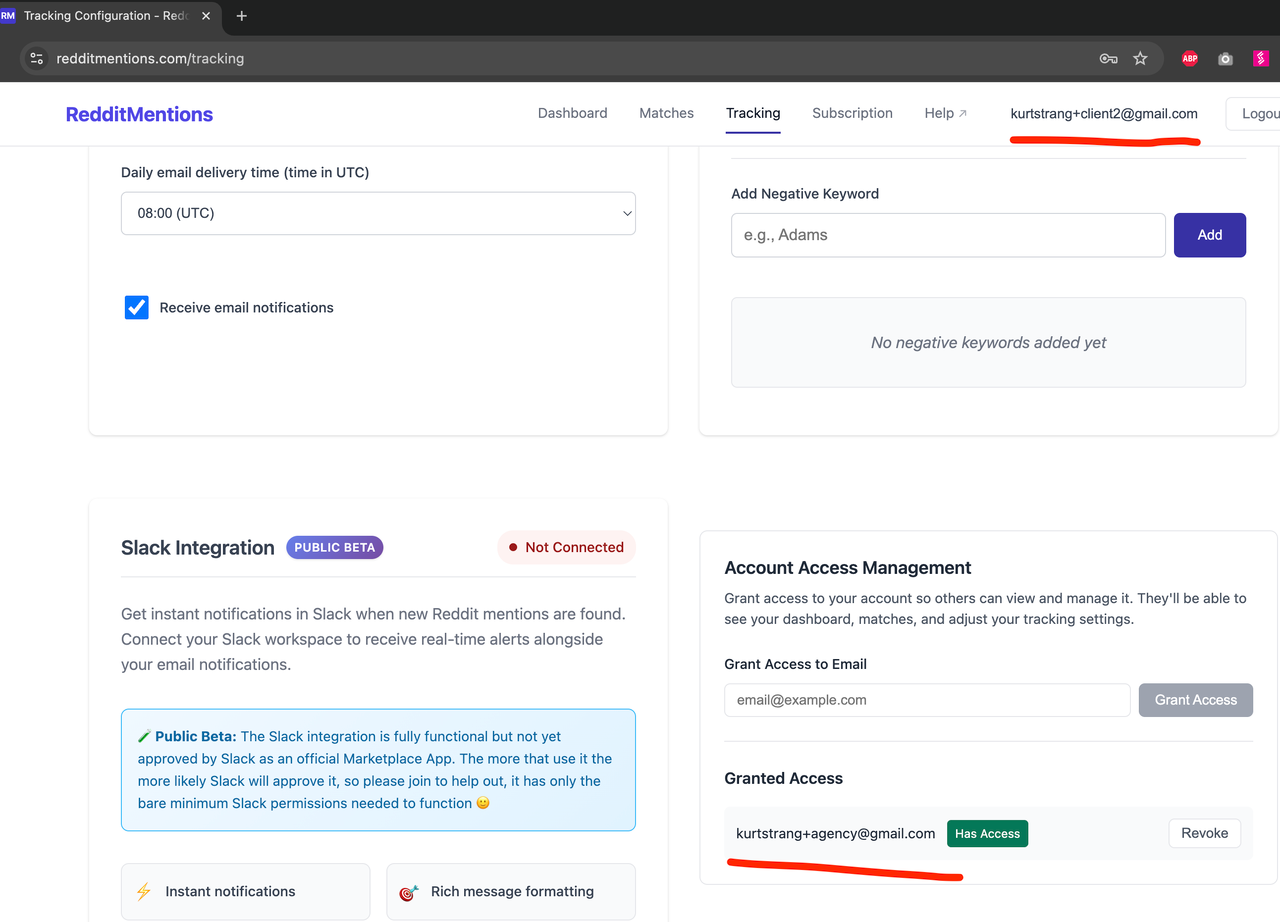
Scroll down until you see the "Account Access Management" section (it's at the bottom of the page)
You'll see a field labeled "Grant Access to Email"—enter the email address of the person you want to give access to
Click the "Grant Access" button
That's it! The person you granted access to can now log in with that email address and see your account. Here below is an example where a user (…+client2@gmail.com) has given access to a colleage (…+agency@gmail.com).
Important notes:
The person doesn't need to have a RedditMentions account yet. Once you grant access, they can create an account with that email and they'll automatically see yours too.
You can grant access to multiple people—just repeat the steps above for each email address.
Multiple accounts can grant access to the same email (useful if you're an agency and multiple clients want to give you access).
What Can People With Access Do?
When someone you've granted access to logs in, they can:
✅ See your Dashboard - View all your matches and monitoring activity
✅ Browse your Matches - Search and filter through all your Reddit mentions
✅ Manage your Tracking Settings - They can:
Add or remove subreddits you're monitoring
Add or remove keywords you're tracking
Add or remove negative keywords
Change your notification preferences (like when you get email digests)
Set up or modify your Slack integration
What They Cannot Do
For your security and privacy, people with access cannot:
❌ Create or change your subscription
❌ Upgrade or downgrade your plan
❌ Access your billing information
❌ Cancel your subscription
Only you (the account owner) can manage your subscription and billing. This protects you from unauthorized charges.
Also important: All notifications and emails will still go to your email address, not theirs. This ensures you always stay informed about your account.
How to See Who Has Access
Want to see who you've given access to? It's easy:
Go to the Tracking page
Scroll to the "Account Access Management" section
Look for the "Granted Access" section below the grant access field
You'll see a list of all email addresses that currently have access to your account
Each person will show:
Their email address
A green "Has Access" badge
A "Revoke" button (if you want to remove their access)
How to Remove Someone's Access
If you need to revoke access from someone:
Go to the Tracking page
Scroll to the "Account Access Management" section
Find the person's email address in the "Granted Access" list
Click the "Revoke" button next to their email
Their access will be removed immediately
Note: Once you revoke access, they'll no longer be able to see your account. If you want to give them access again later, you'll need to grant it again using the steps above.
How to Switch Between Accounts (If You Have Access to Multiple)
If someone has granted you access to their account, you can switch between them easily.
On a Computer:
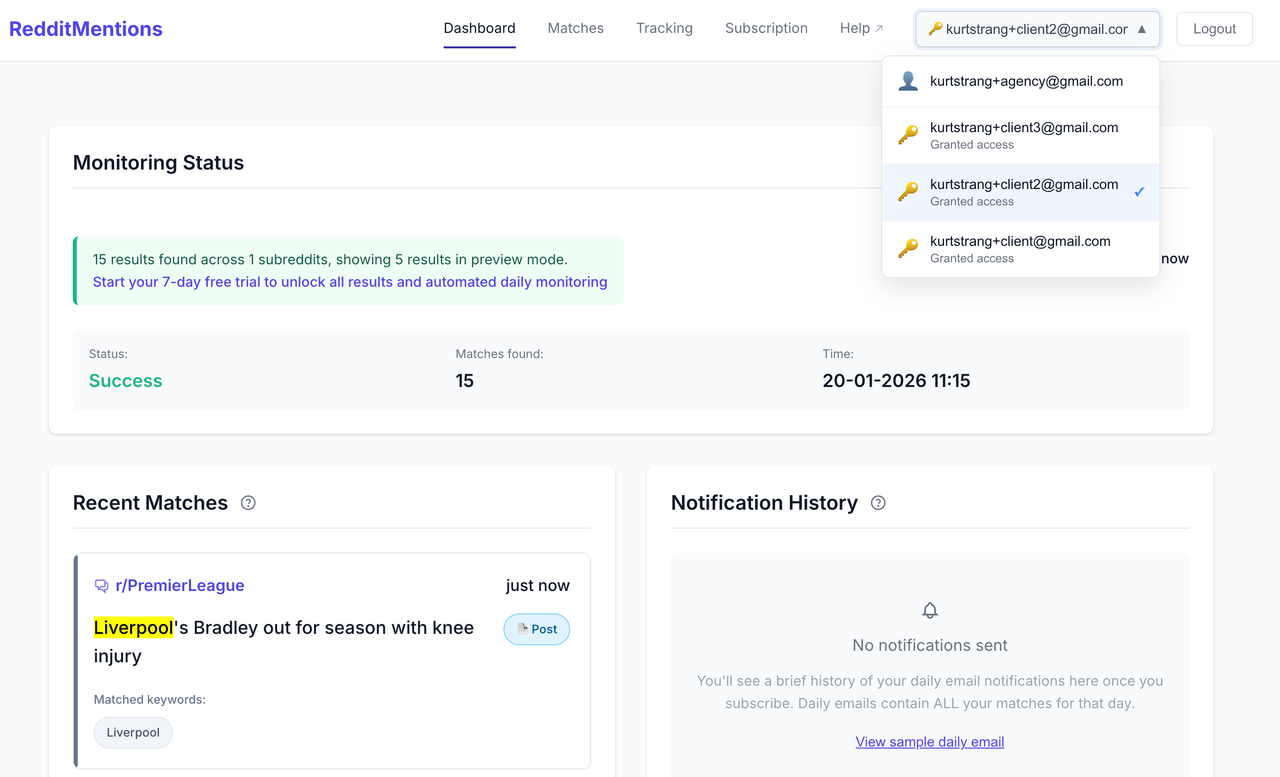
Look at the top right of your screen—you'll see your email address or account name
Click on it to see a dropdown menu
You'll see all accounts you have access to listed there
Click on the account you want to view
The page will refresh and show that account's data
Look for these icons:
👤 Person icon = Your own account
🔑 Key icon = An account someone granted you access to
On Mobile:
Tap the hamburger menu (☰) in the top right corner
At the top of the menu, you'll see the current account you're viewing
Tap on it to see a list of all accounts you can access
Select the account you want to switch to
The page will refresh with that account's information
Common Questions
I granted access but they can't see my account?
I granted access but they can't see my account?
Make sure they're logging in with the exact same email address you used when granting access
Ask them to try logging out and logging back in
Double-check that you entered their email correctly (check for typos)
I can't find the Account Access Management section?
I can't find the Account Access Management section?
Make sure you're on the Tracking page (not Dashboard or Matches)
Scroll all the way to the bottom of the Tracking page
Make sure you're viewing your own account, not someone else's account (you can only grant and revoke access from your own account)
Can I grant access to multiple people?
Can I grant access to multiple people?
Yes! You can grant access to as many email addresses as you need. Just repeat the steps for each person.
What if I want to change who has access?
What if I want to change who has access?
You can revoke access from anyone at any time using the "Revoke" button. Then you can grant access to different people if needed.
Will they be able to see my billing information?
Will they be able to see my billing information?
No. People with access can only see your matches and adjust your tracking settings. They cannot see or change anything related to your subscription or billing.
Can someone with access grant access to other people?
Can someone with access grant access to other people?
No. Only you (the account owner) can grant or revoke access. This keeps you in control of who can see your account.
Was this article helpful? Confusing? Missing something? I’m always happy to hear from you and would love to improve RedditMentions for the better. Reach each out to me at hello@redditmentions.com any time.
Was this helpful?
Still need help? Ask the team